Facebook, Seriously?

So I’m in the middle of creating a new Facebook album with a bunch of photos of friends that I promised to upload since last week, and right when I’m saving the entire album, I get this:

Hang on, let’s get a closer look at that:

So it’s a real scratch-my-head, what-the-heck-just-happened moment, but I’m cool. I hit a new Firefox tab and google “Facebook site maintenance” and guess what? I get a whole bunch of links to a whole bunch of sites with a whole bunch of comments from upset Facebookers who’ve lost access to their Facebook accounts (“upset” being the understated adjective that covers an entire range of emotions from confused to terrified-of-hackers to distressed-over-losing-stuff-from-FB-games to rabid frantic and freaking-out users).

Funnily, these links lead me to threads and blogposts that confirm the existence of this strange occurrence from as far back as 2009 (or even earlier: I didn’t stop to check the dates beyond 2009 because, really, 2 years ago this was happening and it’s still going on today? That’s pretty much long enough for me). Reading thread after thread, comment after comment, I start to see some common factors:

  1. Facebook’s deprivation of your access “due to site maintenance” is like a creepy guy hiding behind a dark corner who pounces on you when you least expect it. You could be in the middle of something and bam~it hits you from left field and you’re down and out.
  2. Facebook’s definition of “few hours” is relative: it could be anywhere from 3 hours to months and months of “not existing” on the site.
  3. “Lost” Facebookers have had no luck in contacting customer service to get a satisfying explanation for the sudden demise of their account (or even whether it’s a temporary thing or a temporary-but-feels-like-permanent thing). * NOTE: I was able to access a link that leads you to new tab that allows you to report your “issue” with Facebook, which I suspect is an improvement from 2009 when there were a lot of freaked-out users running around frantically without any idea of whom to run to or where. Having said that, the more recent posts and threads seem to suggest that there’s *still* no telling whether anyone from Facebook will get back to you or not).
  4. The answer to the question, When can I access my Facebook account? is the same as the answer to When will site maintenance get its act together so my Facebook life can return to normal?  – And that answer would be this: Your guess is as good as mine, baby.
  5. The answer to the question, Is there anything I can possibly do to fix this? is the same one for #5. (Guessing games, here we come!) Some people have tried clearing their cache and cookies, restarting, waiting 3 hours, waiting a week – and a few get it back after 3 hours, others get it back after a week, some after 15 days, and some… well. Who knows if they ever got it back? (There were a lot of hanging unresolved threads, so again, it’s a guessing game).

To shed some light on this confounding thing, I asked my sons (who, by the way, have no problems with their Facebook accounts) to check if I’m “alive” on Facebook and they said they can’t find me on there. LOL. So looks like for now I’m on Facebook limbo.

Oh well. Patience is a virtue, they say. Guess there’s nothing much to do about it except wait and hope that I get my Facebook life back, hopefully, within the next 3 hours. I’m not freaking out at the moment. Thankfully, because I’ve never played games on FB, I don’t have to worry about whether my crops will die or anything like that. I have many friends who do play games, and I totally get how devastating it can be to work hard at getting scores and then face the threat of losing all that hard work. For me, though, Facebook is primarily a great way to keep communication lines open with my friends all over the globe. So do I feel a sense of loss somehow? Am I bothered that I’m floating in limbo right now without any reassurance of when I’ll get back on there? Yep, you could say that. I do so enjoy the ability to instantly bridge the miles and oceans that separate me and my friends (you too! :D) across the globe.

But does this no-Facebook-access eat me up so that my nails are chewed halfway to my knuckles and my hair’s starting to turn frizzy and my arms and legs are experiencing an intense itch to start climbing on walls? No, thank goodness, not yet, no. Only the total loss of net access has had the ability to elicit that kind of nutty behavior from me. 😉

So why am I posting about this? Because my curiosity has been incredibly aroused and I’m hoping you could indulge me by letting me know:

Do you use Facebook? Have you ever experienced this phenomenon of losing access due to site maintenance? Did you get it back and how long did it take before you got it back? And if the answer to all of the above is yes, was everything in your resurrected account intact?

Was your sanity intact?

LOL. Seriously. This is so surreal, losing Facebook access. Thank heavens for blogs, huh? At least we’re in touch. 🙂 xoxox

PS.

Be my guest, Facebook. Do help me. Make my day, buddy. 🙂

F is for 47 Fun, Fabulous, Fantastic Freebies … Fo(u)r You!

The designers, creative team members, and admin at JessicaSprague.com have all been working hard in our digital labs, cooking up something these past weeks to celebrate 4 fabulous years of growing our skills and telling our stories and cultivating friendships on our Spraground…

And tonight is the night we’re throwing confetti and blowing trumpets and and welcoming one and all to this seriously awesome PARTY! We’ve got 47 goodie bags (actually, there’s a little surprise at the end too! 😉 ) to give each one of you!

Be sure you unzip your goodie bags as soon as you pass through each blog so that you can collect the quote strips tucked inside each one. When you’ve gathered all 47 quote strips, arrange them in the correct order then send the completed “quote” to my dear friend Tori (her email addy is on the flyer below), and all those who complete the quote correctly have an additional chance to win the raffle for a sur-PRIZE from us! How awesome is that! 😀

Remember, though, that you need to grab all your goodie bags (and send that completed quote to Tori) between NOW and 10PM EST Sunday (June 26th), which is when our party winds down (and then we get to wipe the traces of chocolate cupcake off our faces and lie down on the grass and smile contentedly at the stars, thanking the heavens for a wonderful weekend-long party 🙂 ).

So while you put on your virtual running shoes and get ready for our 47-stop bloghop, here’s a bit of info to let you know how we’re playing this entire weekend!

THIS IS BLOG STOP NO. 2

In case you’ve arrived here directly, you’ll want to click on the image below to get to the start of the bloghop 🙂

And now… open your arms wide so I can give you a great big (((squeeze))) and this goodie-bag that I’ve created for you!

CLICK ON THE IMAGE ABOVE to grab your freebie 🙂 (And while you’re downloading, you might want to leave a little love on my blog via the COMMENTS box at the bottom? 😉 I just *love* hearing from you! )

Sorry, the download link has expired. Thank you so much for dropping by!

Included in my mini kit are:

  • 3 highly-textured 12×12 patterned papers
  • 3 highly-textured 12×12 solid papers
  • infinity chain
  • stitched grosgrain ribbon
  • journaling tag
  • stapled vintage frame
  • a trio of eyelets
  • pinned tag
  • price code tag
  • heart paper clip
  • extra large embossed acetate title

All my elements come in simple and pre-shadowed versions! 🙂

(PS. For those who live in the US, the colors of my 4EVER Mini Kit are sure to work perfectly for your Fourth-of-July holiday that’s right around the corner! Isn’t 4 such a fabulous number? 😀 )

NEXT STOP on the bloghop is… hang on… let me first remind you (*naughty smiles):

DON’T FORGET … THERE’S MORE THIS WEEKEND!

We have discounts on every class and product in our store through Sunday, June 26! Be sure to stock up on your favorite digi supplies as well as enroll in the classes you’ve been wanting to take!

  • 20% off every self-paced class, including Digital Scrapbooking, Photo Editing, Adobe Illustrator, Digital Organization, and more
  • 30% off our beginner classes, Up & Running with Photoshop and Photo Editing: Good-to-Great Workflow
  • 35% off ALL our DIGITAL PRODUCTS! (Click HERE to go to my shop :D)

And if you’ve missed any of the 27 episodes of Jessica’s amazing Photoshop Friday tutorials and our Hybrid Project Friday tutorials, now’s your chance to grab them for just $1 each before they’re retired forever on June 26th.

AND NOW YOU WANT TO RUN TO…

BLOG STOP NO. 3 – which is the home of the goddess of all things kitschy, Danielle’s blog!

Click HERE to get to Kitschy Digitals, Danielle’s blog!

Have fun, and thanks so much for dropping by! Don’t be a stranger … come back often cos I just love sitting on my blog porch, sipping on iced tea (or hot chocolate :D), and swapping stories with you! (Go ahead and sign up for email subscription on the right top side of this page 😉 ).

See you soon! BIG BIG ((((hugs))))!

I’m alive!

Been buried under multiple projects and a crazy hectic life of deadlines, but just wanted to say I haven’t fallen off the face of the earth and will be with you real soon (with lots of exciting news too)!

In the meantime, let’s rock together to this!

See you soon, lovelies! :*

How to Make a Laptop (in 17 Easy Steps)

It’s no secret that I’m a hybrid wannabe. Here’s the thing, though: the biggest reason why I don’t do much hybrid stuff is because I never have enough time (or motivation) to get out a whole bunch of yummy, textural stuff then create stuff with actual scissors and glue and rulers and cutters while making sure that my younger kids don’t accidentally, say, touch the hot glue gun and then clean everything up after. Phew! See how tiring that was just to read? Can you imagine actually doing it? (Hybrid experts, I salute you!) 😀

So when one of my sons takes home a school project that requires parental participation, I sigh and scratch my head, but really, I’m secretly delighted because I have no choice! I have got to get down on my knees and put my hybrid skillz (whatever little I have 😉 ) to work!

This weekend, it was my six-year-old boy’s turn to be my school-project-partner. The task: Create a toy laptop using at least 5 different recycled or old materials.

Nice.

Well then… there was nothing to do but get to work! (And maybe get the camera out, too, so that in case you ever find yourself having to create a toy laptop from recycled materials, you just might find some cool ideas here! 😉 )

STEP 1: Do the caveman thing: hunt and gather!

First order of the day: Collect all the junk you can get your hands on. Never mind if you won’t end up using half of them. It’s just nice to know that you’ve got enough junk to create with (and by using them, you make space for even more junk to collect! Win!)

STEP 2: Have the essentials ready.

Essentials in this particular case would be the project instructions, your hand-drawn diagram of what the finished project might look like, a list of possible materials to use for each part, and yes, that ever-essential super-mug of coffee (or Diet Mt. Dew or hot cocoa, or whatever makes your little hybrid heart happy).

Step 3: Rule it!

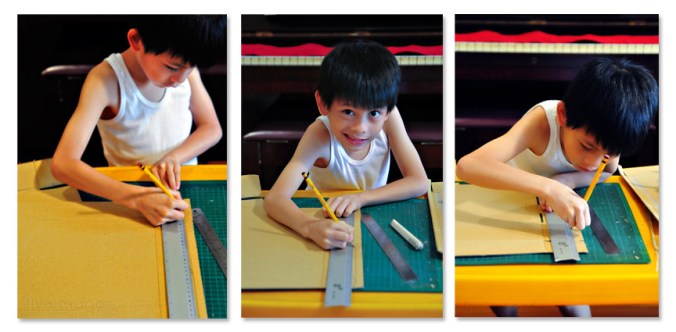
Grab the biggest carton that you can find. (I knew there was a good reason to hold on to that box of my laptop stand! 😆 ). Get the metal rulers out (a metal ruler doesn’t get nicks like plastic rulers do, in case your cutter decides to get naughty and cross paths with it). Start trimming off the edges you won’t need.

Step 4: Get a super-cute hybrid helper.

Just because it’s always fun to work with a cutie. 🙂

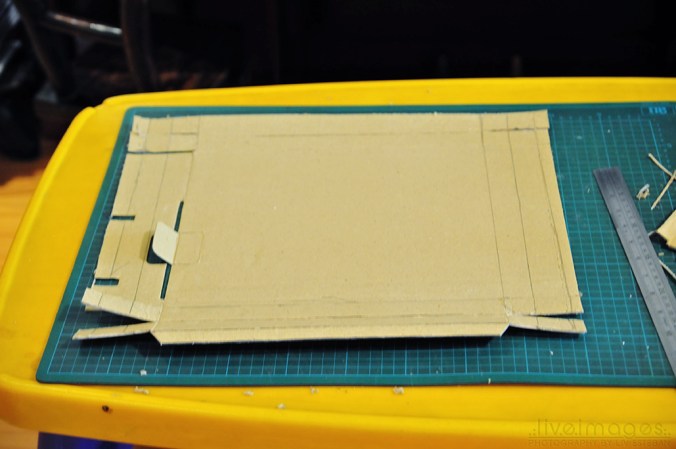
Step 5: Slot it.

Cut little slots into the sides to create flaps, which will then become the fortified sides of your box.

Step 6: Nip and tuck.

Or, actually, fold and tuck… the sides of the box. Use masking tape to keep the flaps down, in case your carton is thick and refuses to stay down.

This is going to form the body of the laptop. (I’m just sayin’… you know… just in case the box starts to resemble something a pizza would be delivered in… which I think it kinda did for a while. And that’s how I knew we needed to break for a snack 😆 ).

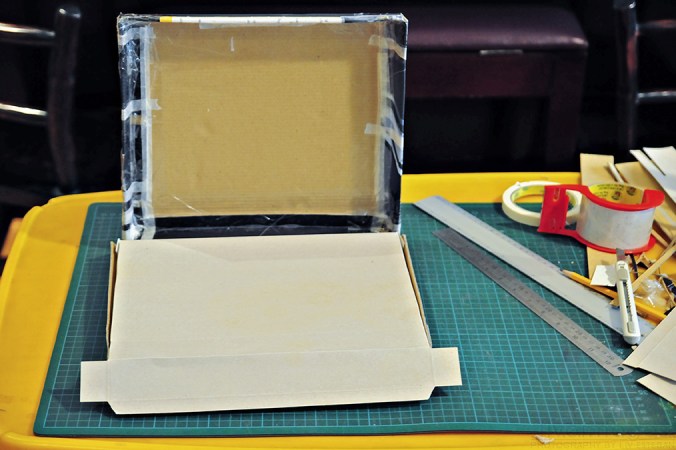
Step 7: Tape and cut.

Oookay. When your tummy is settled and happy, get one side of an old gift box and measure it so that it fits inside your main carton. This will form the base upon which your keyboard will rise. 😉

Tape the sides of the keyboard base. Then cut out 4 strips (measured to fit in the inner part of the other side of your main box). The leftover carton trimmed from the box comes in handy for these little pieces.

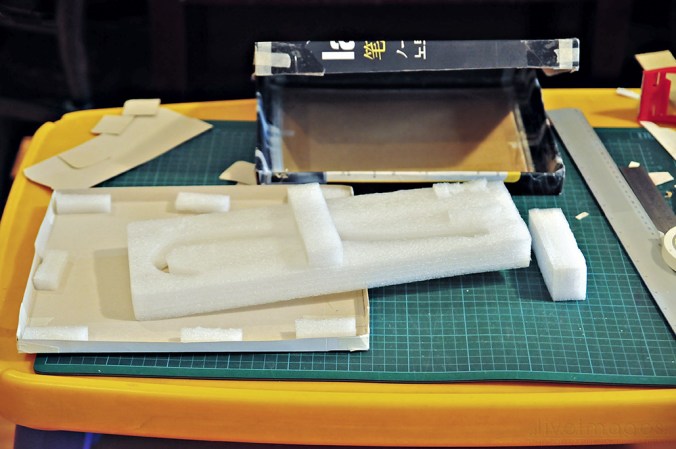
Step 8: Got foam?

If your old box came with packing foam inside it, like mine did, do the happy dance! If it didn’t, any semi-stiff material that you can find lying around will do the lift-up job.

Let me explain the how’s and why’s:

Cut up strips of foam and stick them around the sides of the keyboard base. Oh, and the middle part too! This will take care of the extra cushioning you’ll need so that the keyboard base doesn’t lurch inward once eager kid-fingers start “typing” on the keyboard.

Step 9: Bring out the gun.

Turn the keyboard base over, take your glue gun and shoot glue over the sides where the keyboard edges meet with the lower part of the carton.

Step 10: Slice and dice.

Take the leftover carton and cut little strips for the trackpad (scissors come in handy for curving the corners of the trackpad) and then cut the strips into little squares to form the keys.

Stick all of these temporarily with masking tape on any expendable piece of carton, just so you can see how the keys will all line up (plus it makes it much easier to paint them, which is the next step coming up).

Step 11: Go forth and spray.

Step outside into the great green garden, carrying old newspapers to protect the grass… and spray away with old paint left over from various projects.

Step 12: Be Sharp(ie)!

When the paint has dried, take your Sharpie pen and write the letters and symbols of the keys on the little painted cardboard squares.

TIP: It helps to copy from a real laptop! 😀

Step 13: Monitor, monitor.

Print out whatever image you want to use as your monitor image. For our project, I transformed my Facebook page into my son’s using Photoshop. I replaced the profile photo strip with photos of him working on the project. I included an imaginary conversation between his teacher and him, which was a great place to list all the materials he used on the project. 😀

Step 14: Have an apple.

Print out your logo, cut, and paste on the cover of your “laptop.” (I briefly considered using a mango or some other tropical fruit, but Apple won in the end. Hahaha).

Step 15: Watch the wires!

Take a pipe cleaner and bend it a bit. Stick this onto a strip of black leftover carton (folded in half to create both sides). Tape a tiny piece of cut-off pipe cleaner to form the other metal side of the plug. Stick back and front sides of folded carton with glue gun.

Step 16: Check it out!

Check if your laptop looks fine. Do a whoop and a victory battle cry together with your cutie hybrid helper!

Step 17: Fall in love…

… when you see the look of sheer delight and excitement on your little project-partner’s face!

And voila! You’re done! Wooooooot!!!

PS. And if it looks like your little ones aren’t going to sleep early that evening because they’ve “got work to do” on their laptop, don’t say I didn’t warn you! 😉

New Year, New Look


Well, hello there! Remember me?

It’s been way too long since I last enjoyed your company. Forgive me. Life can get crazy busy, you know that, right?

But this is the first month of a new year, and along with it comes a fresh chance to begin again!

And to celebrate new beginnings and the new year, I decided to give my blog porch a new look! 😀 Let me know if you like the fresh new (if a bit messy) paint! 🙂

((((hugs))))

You have exactly 11 hours and 31 minutes…

… to snag my photography-inspired FREE mini kit
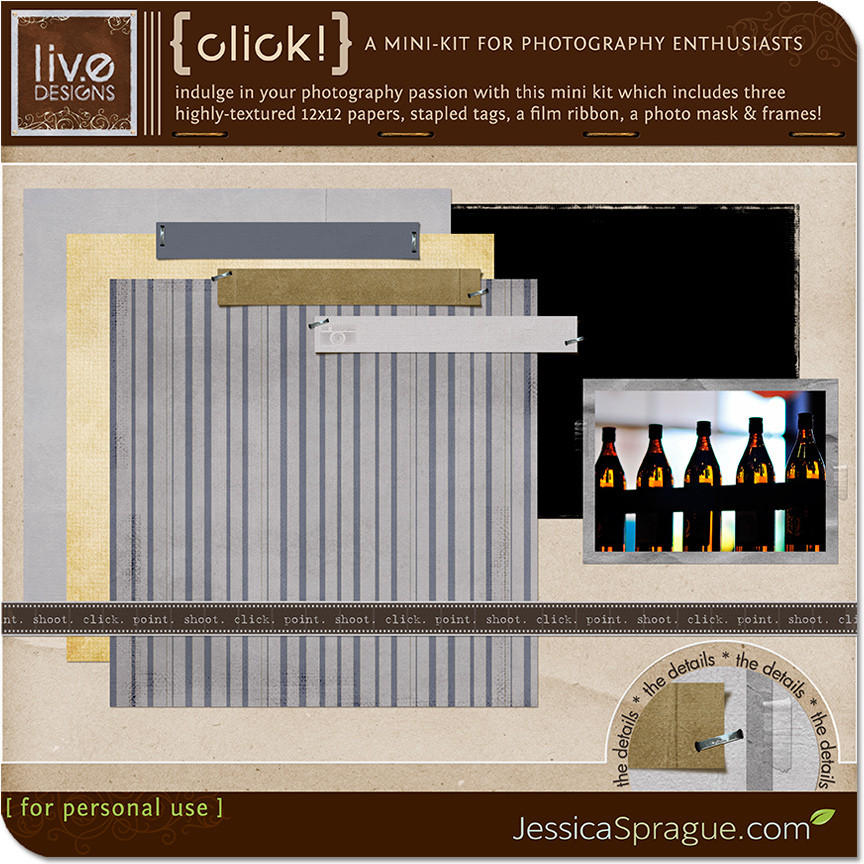
{ click! } - a mini kit for photography enthusiasts!

… and check out my feature (blush blush) in the designer spotlight at jessicasprague.com

… and grab anything you’ve wanted from my shop especially since *ALL* my products are at 25% off!

And remember! All these goodies and all this wonderful fun will only be available till midnight Eastern Standard Time, so make sure you come visit jessicasprague.com and digilovely.com before the clock strikes 12 and carriages turn into pumpkins! 😉

One-Buck Wednesday!

Wednesdays at the Spraground (aka jessicasprague.com) are always huge party-days when designers put up some really choice items for … wait for it… nothing more than a buck! Can you imagine the amazing chance to preserve your precious memories with awesome made-with-love schtuff that costs less today than a hotdog?

Yup. Awesome. Totally. 🙂

Just wanted to let you know that I have my {Swirly Words} Stamps & Brush Set on One-Buck Wednesday!

Perfect for adding movement and energy and a touch of whimsy to your layouts, there are 14 super-fun and super-swirly words in this element pack. They come as stamps (in .png format) so that you can use them with any program, and as a brush set (in .abr format) so that you can resize them and color them as you wish.

You’ll get a mix of brush sizes, and a good number of them are large enough to fit a 12×12 layout horizontally and vertically. Use them to add color and a dash of playfulness to your creations!

Click HERE or on the image below to get them for a buck at our JessicaSprague.com shop!

Check out these awesome layouts created by our JessicaSprague.com Creative Team!

Love the fresh sweetness of Miki’s layout!

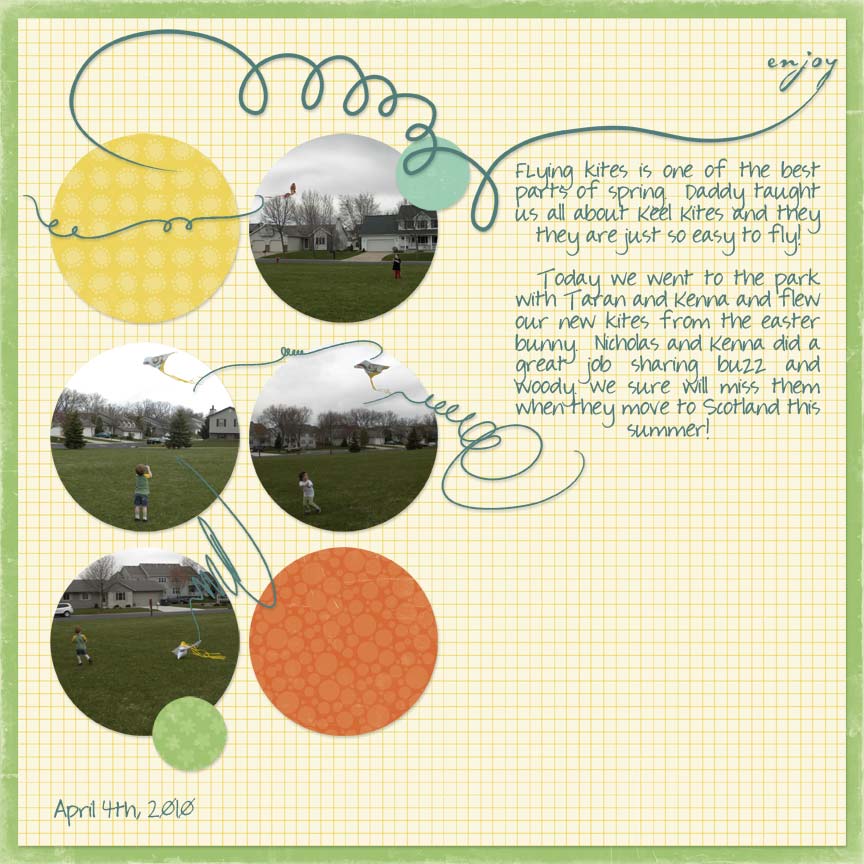
Oooh, all that swirly wispy movement that mimics the flight of kites on Chris’ layout!

And yet another deliciously juicy layout from the awesome Miki!

Check out our JessicaSprague.com homepage for more One-Buck Wednesday goodness from my designer-sistas!

So… what’cha waitin’ for? Just say yes! 😀

For the Young, the Once-Young, and the In-BeTWEENs

Age does not diminish the extreme disappointment of having a scoop of ice cream fall from the cone.  ~Jim Fiebig

Nor does it diminish the extreme joy of creating an album to hold your most precious memories!

We have three new exciting classes that are opening today at jessicasprague.com! And like a scrumptious banana-split festival, there are three flavors, perfect for the young, the once-young, and the in-beTWEENs among us!

First off, we have the newest instructor-led class (with no less than the awesome Jessica Sprague at the helm), the Family History Album Class!

Record the stories of your ancestry; tell the funny, touching, and unforgettable stories of your parents, grandparents, and the other branches of your family tree! I can think of no better way to get this all-important job of memory-keeping done than to create a 20-page heritage album (and even get it printed when you’re done, if you so desire!)

Classes begin on October 11th (that’s next Monday).

Click on the image below to learn more about the class! And when (not if 😉 ) you decide that this is *just* what you’ve been dreaming of, clicking on this image will also bring you to the very place where you can sign up!

And for all those who are 8 – 18 years of age (or feeling 8 to 18 😉 ), you now have the chance to create your own Awesome Album! Whether this will be your first time to create a digital scrapbook album, or your nth time, you’ll love this opportunity to create your own 20-page album about yourself! Got homework and will be busy on some days? No worries! The class is self-paced, so you can go as quickly or as slowly as you wish!

You’ll get an awesome kit designed exclusively for the class by my beloved cereal-munching great friend Nisa, and (get our your bullhorns and announce this to the world), you’ll be led in the class by the Great Jessica Sprague! When you complete your album you’ll be able to share it with all your friends and loved ones in two different ways! Intrigued yet? Read all about it by clicking on the images below!

The Tween Album Class (featuring loads of doodles and bright colors and sweetness all over):

The Teen Album Class (featuring coolness in the form of paint swashes, rockstar titles, and stereos!):

Well? Whatchawaiting for? Go run and sign up and give yourself (and your friends) this gift of a class and album rolled into one!

Gotta get started now on my design work, so I’ll see you soon!

PS. Have you clicked on the images above yet? Don’t be shy: go right ahead and CLICK. 😉

Cool Schtuff #2

Oooh! Two delightful discoveries in one day: could anything be cooler? 😀

TheFunTheory.com believes that fun is a great motivator; carry this theory further and then come up with the thesis that the easiest way to change people’s behavior for the better (i.e., get them to make the better, wiser choice) is simply to make it fun. Oooh. My kind of theory. My kind of people!

Now if only we could let world leaders in on this secret, and therefore get them to go about their business of effecting GOOD change in a fun way, that would be completely awesome now, wouldn’t it?